What is the difference between DTF and DTG printing?
Overview
This article explains the differences between DTG (Direct-to-Garment) and DTF (Direct-to-Film) printing technologies used at BurgerPrints. It helps users understand how each method behaves on different fabrics and design types.
It is for users who are unsure which printing method is more suitable for their products, designs, or target customers.
After reading this article, you will understand how each method works, when to use DTF or DTG, and how printing choices affect fabric compatibility, print quality, and durability.
This helps you avoid incorrect printing selections that may lead to unsatisfactory results or unnecessary reprints.
About DTF and DTG Printing
BurgerPrints supports both DTG (Direct-to-Garment) and DTF (Direct-to-Film) printing for apparel products. Each technology processes ink differently. Because of this, the same design file can produce different visual results depending on the printing method and fabric type.
Choosing the correct printing method is not about which technology is better. It is about:
How ink interacts with the fabric
How your design is structured (solid colors vs transparency, bold vs soft effects)
What final look and feel your customers expect
How the product will be used and washed over time
Most post-production claims related to printing quality come from:
Selecting a cotton-based printing method for blended fabrics without reviewing expected results
Using transparency-based designs on a method that does not support smooth fading
Expecting glow, metallic, or special effects that standard ink printing cannot reproduce
Applying the same design across different fabric types without adjusting expectations
Understanding the technical behavior of DTG and DTF helps you control expectations before launching a product.
How DTF (Direct-to-Film) Printing Works
DTF (Direct-to-Film) printing prints the design file onto a special PET transfer film using water-based inks. Adhesive powder is applied to printed ink, then cured with heat. The finished transfer is later heat-pressed onto the garment.
Because the design is transferred as a physical layer, the ink sits on top of the fabric instead of being absorbed into it. This behavior is the key reason DTF works across many fabric types.
DTF printing process
Print the design file onto a special PET transfer film
Apply adhesive powder to the printed ink area
Cure the adhesive powder using heat
Heat press the transfer onto the garment
Peel the transfer film (hot or cold peel, depending on material)
Although DTF involves multiple steps, the production time per item remains short and is well suited for scalable fulfillment.
DTF performs best with
Designs featuring bold colors and solid shapes
Glow, sparkle, metallic-style, or high-contrast effects
Designs that DTG cannot process effectively
A wider range of fabric types, including blended materials
Because the print layer is applied onto the garment surface, DTF offers strong color visibility and defined edges across different fabrics.

Limitations of DTF printing
DTF printing still involves a physical print layer and adhesive bonding process. While DTF supports a broader range of visual effects, it has its own constraints:
The printed layer may crack or peel over time, especially under frequent washing or heavy use. Overall durability may be lower compared to DTG in long-term wear
Semi-transparent areas may not blend as smoothly as expected.
Low-opacity elements can appear slightly uneven or less consistent.
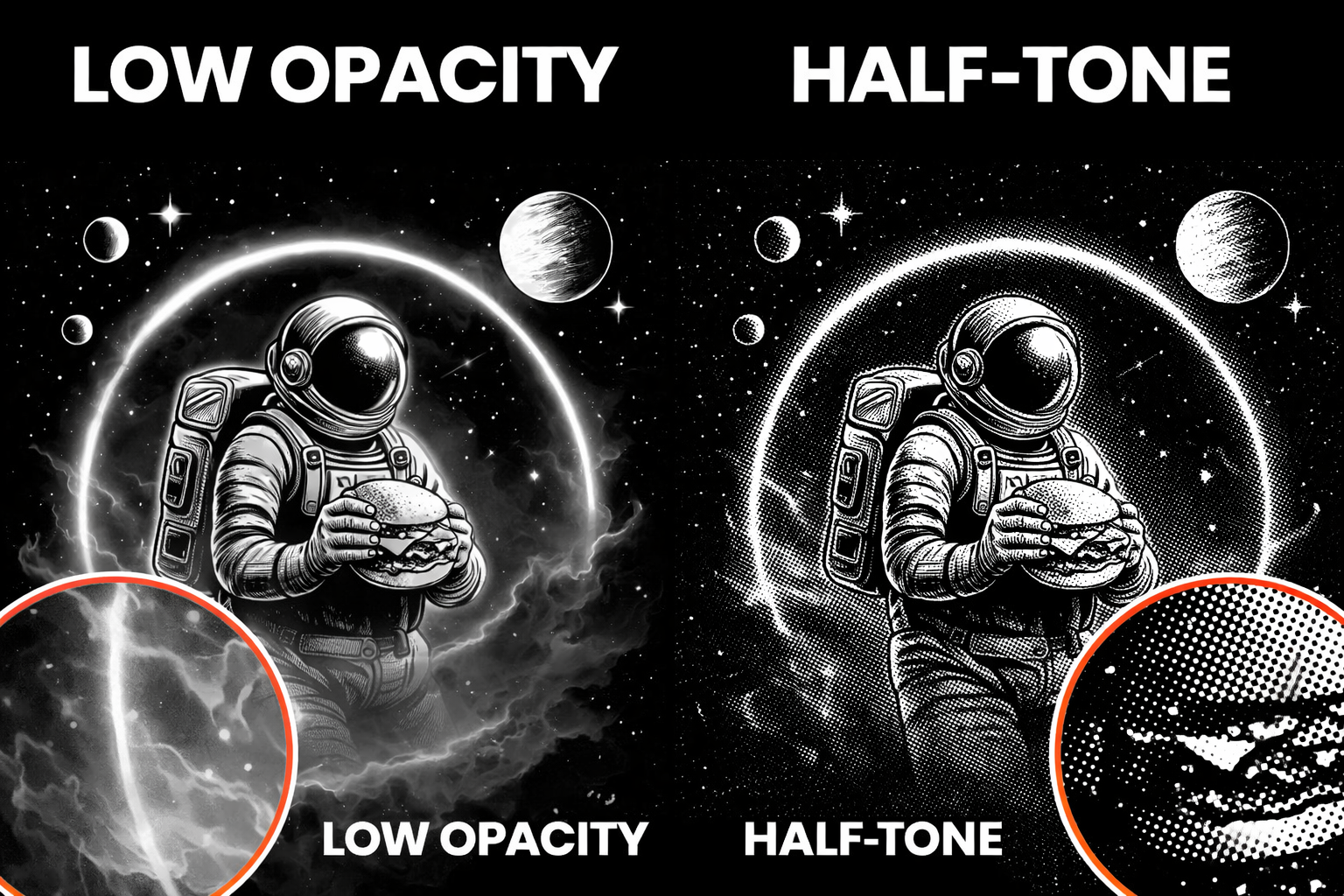
DTF is not optimized for designs with fade-out transitions, low opacity elements, smoke, mist, or soft transparency effects, designs that rely on subtle blending between colors

Designs with extensive low-opacity effects, fade-outs, or atmospheric textures should be reviewed carefully when printed using DTF. DTG is generally the safer choice for these design types.
Halftone vs transparent gradients in DTF designs
DTF printing does not reproduce transparent gradients reliably. Effects that fade from color to transparency - such as glow, smoke, or mist - may print unevenly or lose detail.
For better results, prepare DTF designs using halftone patterns instead of transparency. Halftones use dots at 100% opacity that gradually change in size and density, allowing smoother visual transitions and more consistent ink coverage.

Best practice for DTF designs
Use 100% opacity for key elements
Avoid gradients that fade into transparency
Replace transparency-based effects with halftones
Gradients between solid colors are acceptable
How DTG (Direct-to-Garment) printing works
DTG (Direct-to-Garment) printing is a method where ink is sprayed directly onto the garment using specialized printers.
The ink absorbs into the fabric, creating a soft, breathable print that feels natural when worn.
DTG printing is one of the most common printing methods in print-on-demand.
How the DTG Printing Process Works
The DTG printing process includes:
Place the garment on a printing platen
Apply a pre-treatment solution to help ink bond with the fabric
Spray water-based ink directly onto the garment
Cure the ink using heat to create a durable print
This process requires fewer steps than DTF printing and works efficiently for single items.
DTG performs best with
Designs that include fine details and smooth gradients
Photographic artwork
Designs with fade-out effects, low opacity areas, smoke, or soft texture transitions
Products made from 100% cotton, where ink absorption is optimal
Because the ink bonds directly with the fabric, DTG prints generally maintain good color stability and durability when applied to suitable materials.
Limitations of DTG printing
DTG printing quality depends heavily on fabric composition and color interaction:
Blended fabrics may produce less consistent results compared to 100% cotton fabrics
Print configuration must adjust based on garment color and design color balance, which means a single print setup cannot apply uniformly across all products
DTG is not optimized for designs that rely on:
Glow or sparkle effects
Reflective or fluorescent colors
Matte finishes
Designs with many sharply separated color blocks or complex layered color effects
In these cases, DTG may produce muted results or lose the intended visual impact. Designs with strong visual effects or solid color separations are better suited for DTF printing.
Fabric composition and DTG printing behavior
DTG (Direct-to-Garment) printing results vary depending on the fabric composition of the product. This is normal material behavior and not considered a printing defect.
100% Cotton fabrics (such as Solid T-Shirt, Lady T-Shirt, Tank Top) absorb water-based DTG ink more evenly. Because the ink penetrates the cotton fibers effectively, prints on 100% cotton typically appear:
Smoother and more consistent
Sharper in fine details
More stable in color saturation
Blended fabrics (such as Hoodies, Sweatshirts) contain polyester fibers that do not absorb DTG ink in the same way as cotton. On these blended materials, DTG prints may:
Appear slightly lighter or less saturated
Show more visible fabric texture
Have a different surface feel compared to prints on 100% cotton

These visual differences come from how ink interacts with different fiber types and are expected outcomes of DTG printing on blended fabrics. They do not indicate production errors or quality issues.
When selecting products for DTG printing, users should consider fabric composition as part of the design and product choice to ensure the final result matches their expectations.
DTG or DTF Printing: Practical Comparison
The table below highlights the key differences between DTG and DTF printing based on common decision factors such as fabric compatibility, print quality, durability, and use cases.
Printing method
Prints the design on film, then transfers it to the product using heat
Prints ink directly onto the fabric
Fabric compatibility
Works on most fabric types, including cotton, polyester, nylon, fleece, and blends
Works best on cotton and natural fabric blends
Printing on dark products
Does not require pre-treatment
Requires pre-treatment for dark products
Print feel
Slightly thicker print layer that sits on top of the fabric
Soft and breathable print that blends into the fabric
Color vibrancy
Strong and consistent colors on all fabric colors
Color intensity depends on fabric absorption
Design complexity
Supports photos, bold graphics, detailed artwork, and gradients
Supports detailed designs, but gradients may appear softer
Durability
Resistant to cracking and washing damage when cared for properly
Durable, but colors may fade slightly over time
Production flexibility
Suitable for a wide range of product variants
Best for focused product lines (mainly cotton)
Best use cases
Mixed fabrics, colorful designs, logos, and versatile catalogs
Cotton products, detailed artwork, small order quantities
How To Choose The Correct Printing Method
Before publishing or scaling a product, review these 3 factors:
Check fabric composition first
If the product is 100% cotton → DTG is usually optimal.
If the product contains high polyester or blended fibers → DTF often performs more consistently.
Review your design structure
Choose DTG if your design includes:
Photographic elements
Soft fades
Low-opacity textures
Fine detail work
Choose DTF if your design includes:
Solid bold shapes
High contrast graphics
Logo-style artwork
Strong color blocks
Align with customer expectations
Based on your customer expectations, you can align the suitatble printing method.
Before choosing DTG or DTF, consider the following:
If customers expect a soft and natural print feel: DTG printing is generally more suitable. Because the ink absorbs directly into the fabric fibers, the final print feels lighter, softer, and more breathable. This option is ideal for customers who prioritize comfort and a subtle finish.
If customers expect strong color contrast and defined edges: DTF printing may be more appropriate. Since the design is transferred as a surface layer, colors often appear more vibrant and outlines more clearly separated, especially on blended or synthetic fabrics.
If customers expect smooth fade effects or soft gradients: DTG is typically the safer choice, as it reproduces low-opacity elements and gradual transitions more naturally.
If customers prioritize fabric flexibility across multiple product types: DTF can offer more consistent results across cotton, polyester, and blended fabrics.
Understanding what your target customers value most—softness, vibrancy, fine detail or versatility—helps you select the correct printing method and reduce the risk of dissatisfaction after production.
Choosing based on customer expectations ensures that the final product matches both visual and tactile expectations.
Tips and Best Practices
Always review fabric composition before selecting a product variant.
Do not apply the same design across all SKUs without reviewing material differences.
Avoid transparency-heavy designs when using DTF.
Use 300 DPI high-resolution design files.
Follow washing instructions carefully to maintain durability.
Order samples when launching a new design style or testing a new product type.
Educate your customers about realistic print expectations (no real glow, no metallic ink unless specified).
Frequently Asked Questions
Can I choose DTF or DTG printing manually for my orders? Printing methods depend on product type and material. Available options are shown in the product details on the Dashboard.
Which printing method is better for dark-colored products? DTF printing is more suitable for dark-colored garments because it delivers stronger color vibrancy.
Does DTG printing crack after washing? DTG prints are durable when care instructions are followed, but they are best suited for cotton fabrics and light to medium color ranges.
Can the same design be printed using both DTF and DTG? Yes, but the final result may look different due to how ink interacts with the fabric in each method.
Which method should I choose for bulk orders? DTF printing is often preferred for bulk orders across multiple fabric types, while DTG works well for small batches or one-off orders.
Related Articles
Last updated
Was this helpful?