> For the complete documentation index, see [llms.txt](https://help.burgerprints.com/llms.txt). Markdown versions of documentation pages are available by appending `.md` to page URLs; this page is available as [Markdown](https://help.burgerprints.com/faq-and-troubleshooting/faq/how-does-burgerprints-charge-tax-during-fulfillment.md).
# How does BurgerPrints charge tax during fulfillment?
### Overview
This article explains how taxation works on BurgerPrints and guides you through adding your VAT ID and checking tax information when creating a test order.
### Does BurgerPrints charge tax during fulfillment?
BurgerPrints does not always charge tax during fulfillment. Whether tax is applied depends on the fulfillment location, the destination country, and the tax information you have provided.
To help you understand this better, the following sections break the topic down step by step, starting with the basics.
### What is VAT?
Value-Added Tax (VAT) is a consumption tax applied to goods and services sold or used within the European Union. It applies to domestic sales within an EU country, cross-border sales between EU member countries, and goods imported into the EU from non-EU countries.
### How VAT is calculated?
VAT is automatically calculated as a percentage of your order subtotal (before discounts) and added to the total order amount. The exact VAT rate applied depends on the destination country of the order.
### **Is the VAT tax reclaimable?**
Yes, VAT tax can be reclaimable if you are registered as a VAT payer. You may reclaim VAT charged by BurgerPrints to avoid double taxation and prevent VAT from becoming a business expense. To do this, click "**Download invoice**" button available for orders with ‘**Paid**’ status and include the invoices in your VAT declaration.
### When VAT is applied?
* Orders fulfilled outside the EU and shipped into the EU:\
VAT always applies if orders are fulfilled outside the EU shipped into the EU. If you do not provide an IOSS number when creating an order, BurgerPrints will use its own IOSS and charge VAT into your total order amount. However, if you provide a valid IOSS number, BurgerPrints will not charge VAT, as it assumes you will collect and remit VAT through your own IOSS registration.
* Orders fulfilled within the EU:
Whether VAT is charged depends on where your product is fulfilled, where it is shipped to, and whether you have submitted a valid VAT ID to BurgerPrints. The VAT scenarios for EU-fulfilled orders are explained below:
* VAT is **not charged** only if **all** of the following conditions are met:
* You have submitted a valid VAT ID
* The destination country and the fulfillment partner’s country are different countries
* The destination country is not Estonia
* Example: You have submitted VAT ID of Poland, your order is fulfilled in France and the order is shipped to Finland
* VAT **will be charged** when at least **one** of the following conditions is met:
* You have not submitted a valid VAT ID
* The destination country and the fulfillment partner’s country are the same country (example: Order is shipped from France to France)
* The destination country is Estonia (example: Order is shipped from France to Estonia)
### What are the differences between IOSS and VAT ID?
IOSS and VAT ID serve different purposes and apply in different situations. The differences are explained below:
| Topic | VAT ID | IOSS |
| ------------------------ | ----------------------------- | ------------------ |
| **Used for** | EU → EU sales | Non-EU → EU sales |
| **Fulfillment location** | Inside the EU | Outside the EU |
| **Buyer type** | B2B / B2C | B2C only |
| **VAT collection** | At checkout or reverse charge | Always at checkout |
| **Customs involvement** | No | Yes |
To learn more about IOSS and how it applies to EU orders, you can read it [here](/shipping-and-delivery/special-service/how-to-update-ioss-information-for-eus-orders.md).
### How to submit VAT IDs to BurgerPrints?
#### Step 1: Access Taxes page
On the side navigation, access **Taxes** submenu under the **Billing** menu
#### Step 2: Review your account details
Make sure that all of your business details are correct. You can update business details by clicking the "**Edit in my account**" button.
#### Step 3: Enter your VAT IDs
* Select the EU issuer country of the VAT ID that you registered.
* Enter your VAT ID number. Each country has a different VAT ID format. Make sure you include the country prefix in VAT ID.
* You can submit multiple VAT IDs.
#### Step 4: Submit VAT ID
* Tick the confirmation box to **confirm that the VAT ID provided is registered to your business and should be used for billing and tax reporting going forward.**
* Click the "**Submit VAT ID**" button. After submitting, the system will take some time to check the validity of the entered VAT ID. You can view the validity status and delete your VAT IDs.
### How to check tax information using a test order?
You can create a test order allowing you to preview how tax will be applied before going live. Follow the steps below to verify your tax settings.
#### Step 1: Confirm your tax profile
Before creating a test order, make sure:
* Your business information is correct and complete.
* Your VAT ID has been submitted and validated.
#### Step 2: Create a test order
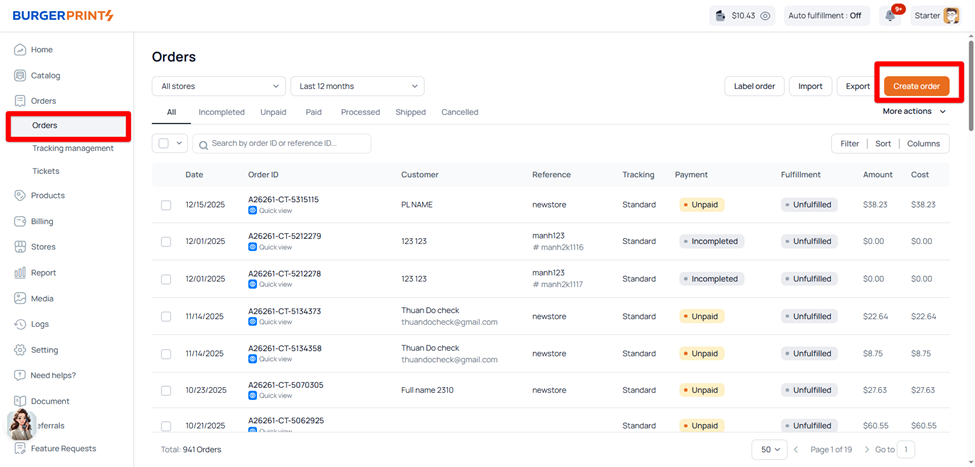
1. Go to **Orders** and click "**Create order**" button.
2. Add one or more products to the order.
3. Choose a shipping destination country.
To fully test tax behavior, you may want to create multiple test orders using different fulfillment locations and destination country (EU vs non-EU).
#### Step 3: Review the Tax
In the fulfillment cost summary, check:
* Whether VAT is applied.
* The VAT rate used.
* The taxable amount (product price, shipping, applicable fees) without discounts.
* Which product lines are taxable (EU vs non-EU fulfilled items).
You can check the details of taxes by hovering over the (i) information icon beside (if any).
#### Step 4: Adjust If Needed
If the tax result does not look as you expected:
* Double-check your VAT ID submission.
* Verify fulfillment origin and shipping destination.
* Review discounts, as they affect the taxable amount.
After testing how tax is applied, you can delete the test orders.
### Frequently Asked Questions
1. **How is tax calculated if my order has both EU and non-EU products?**\
If your order contains products fulfilled from both EU and non-EU countries, VAT is calculated **only on the product lines fulfilled outside the EU**, including their related fees.\
**Example:** If an order includes products fulfilled in the US and France and is shipped to Poland, VAT is applied only to the product lines fulfilled in the US.
### Related Articles
* [How to update IOSS information for EU's orders](/shipping-and-delivery/special-service/how-to-update-ioss-information-for-eus-orders.md)